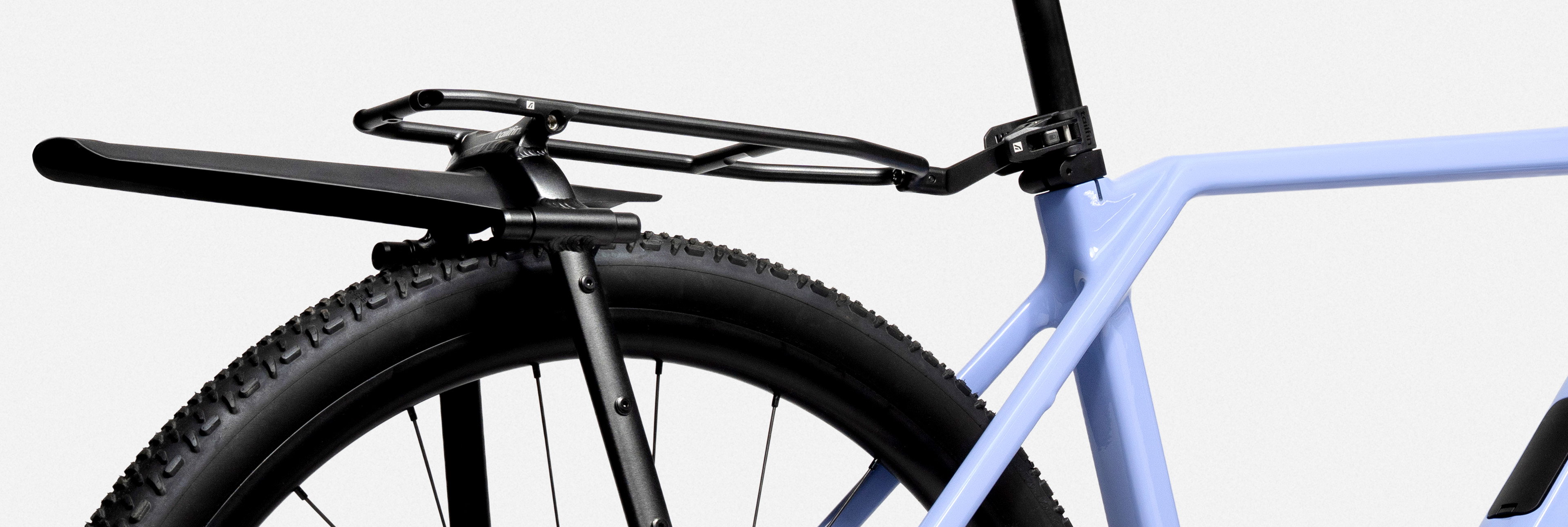
Fitting a CargoPack (formerly known as the AeroPack) to the Sonder Camino Ti

Introduction

Note: This guide references our AeroPack, which is now available as the CargoPack system or as part of our modular Pannier Rack range

The Camino is currently available in alloy, steel, and titanium versions, and the frames have undergone small changes since their introduction.  

Sonder Camino bike with Tailfin CargoPack (formerly known as AeroPack) and other Tailfin Bags.
Sonder Camino Ti (2024), size M.
Featuring: Large Cargo Cage, 0.8L Zip Top Tube Bag, 0.9L Rear Top Tube Bag, 4.5L Half Frame Bag, Carbon CargoPack with a 16L Mini Pannier.

Configure your Tailfin Order

Website axle configuration
Choose the right axle for your bike in step 2 of configuring your CargoPack order
Sonder Camino Thru Axle
To see what Thru Axle type you require, we recommend checking for any text on the original Thru Axle too

You may wonder why we recommend using a Universal Thru Axle for the Camino despite its on-frame mounting points. These mounts are also for rack mounting, but Thru Axle mounting is the strongest option, which works for the majority of bikes. By attaching your Tailfin system to the axle, the stresses on your frame are almost eliminated. It is the mounting approach we recommend above all others. 

Additional Considerations with the Sonder Camino

Additionally, titanium and steel frames often have ‘hooded’ dropouts. This is where the frame obscures the space above the dropouts – the location required for mounting the Tailfin arch. The Universal Thru Axle comes with up to 15mm in extenders, which can be added centrally, between the two axle ends. This pushes the rack mounts further out – beyond the ‘hoods’ of these frames. Both the carbon and alloy racks have been designed with a degree of flex to accommodate this width difference. The QR Axle mounts are wide enough to clear the ‘hooded’ frame.

Rear dropouts of a Sonder Camino Ti with UDH
Sonder Camino Ti with a 12mm Thru Axle and Sonder-specific UDH (this part will need to be replaced by the SRAM UDH)
QR dropouts of a first or second generation Sonder Camino Ti
Earlier generation of Sonder Camino Ti with a QR Axle

You may find that you lack clearance between the dropout and the rack/mudguard mounting point when using the Sonder Camino 2024+ (below). We recommend using clip-on mudguards to avoid this issue.

Fast-Release Dropouts mounted to the Universal Thru Axle on the Sonder Camino
You may struggle to mount mudguards alongside your CargoPack because of the tight spacing between the dropout and the bolt. We recommend using clip-on mudguards to avoid this issue.

Time To Assemble

Tailfin CargoPack (formerly known as AeroPack) Assembly

Fit the new axle

Follow the steps below to install the new axle:

Removing the Sonder Camino Thru Axle
Remove the Sonder Camino Thru Axle
Removing the Sonder UDH bolt
Remove the Sonder UDH bolt
Detaching the rear derailleur from the Sonder UDH
Detach the rear derailleur from the Sonder UDH
Tightening the SRAM UDH Adaptor
Reattach the derailleur to the official SRAM UDH and insert the UDH Adaptor using the hex reducer provided
Attaching the two ends of the Universal Thru Axle together
Join the two ends of the Universal Thru Axle together, including the extenders in the centre and tighten to 5Nm with 5mm hex keys
Installing the Tailfin Universal Thru Axle
Insert the wheel and install the tailfin Universal Thru Axle, tightening to 8-10Nm with a 5mm hex key on the non-driveside (left)

You can leave the axle fitted even without the CargoPack attached. It’s normal for threads to show on the driveside – it is just as safe as your original axle, as the number of axle threads engaged with the frame is the same. To remove the Universal Thru Axle (and to avoid the axle separating within the wheel), undo it from the driveside (right) of your bike.

Universal Thru Axle installed on the Sonder Camino (non-driveside)
Use spacers to align the axle evenly on the non-driveside
Universal Thru Axle installed on the Sonder Camino (driveside)
It is normal for threads to show on the driveside

Attach your CargoPack

The last step is to attach the CargoPack to your Camino. It’s often easier to do this standing behind your bike.

Open Fast-Release Dropouts mounted on the Universal Thru Axle
Connect the Fast Release Dropouts around either side of the axle
Seatpost connector attached to the seatpost
Secure the Seat Post Connector in place and ensure it’s locked shut

Once securely mounted and the pre-ride checks have been made, you’re ready to ride!

Optional Extras

Tailfin Rear TopTube Bag and Frame Bag example (zoomed)
0.9L Rear TopTube Bag with 5.3L Half Frame Bag
CargoPack with 16L Mini Pannier
Carbon CargoPack with 16L Mini Pannier
Large Cargo Cage mounted on the Sonder Camino carbon fork
Large Cargo Cage

Happy riding!