Estimated reading time: 3 minutes
How to change between the Tailfin Pannier Racks, CargoPacks and SpeedPacks and why you may choose to do this
You may already own a Tailfin Pannier Rack, CargoPack or SpeedPack, or perhaps you’re considering purchasing one (use our Comparison Guide if you’re unsure which option is best for you). At first glance, it may look like this decision is final, with no option to convert later down the line. However, the good news is that all of our systems are modular – meaning our Rear Systems share a lot of the same parts. This makes switching setups a fairly simple process with only a few extra parts required.
Perhaps your riding style has changed, or you’ve signed up for an off-road ultra, and you want to optimise your setup for the event. This guide outlines some scenarios why you may wish to convert and also the products required. However, as some of our bags have changed over recent years, it’s important to ensure you choose the right parts to make your setup work.
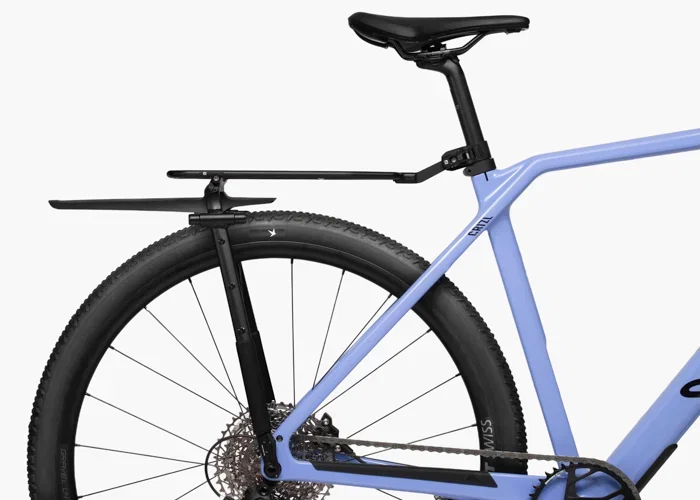
We recommend Rack setups for road riding, light gravel, touring and commuting. The Rack acts as a base on which a Rack Top Bag and side Panniers can be attached. So if you only need to carry a laptop to the office, you can ride in with just a Pannier bag attached – no need for a Rack Top Bag, too.
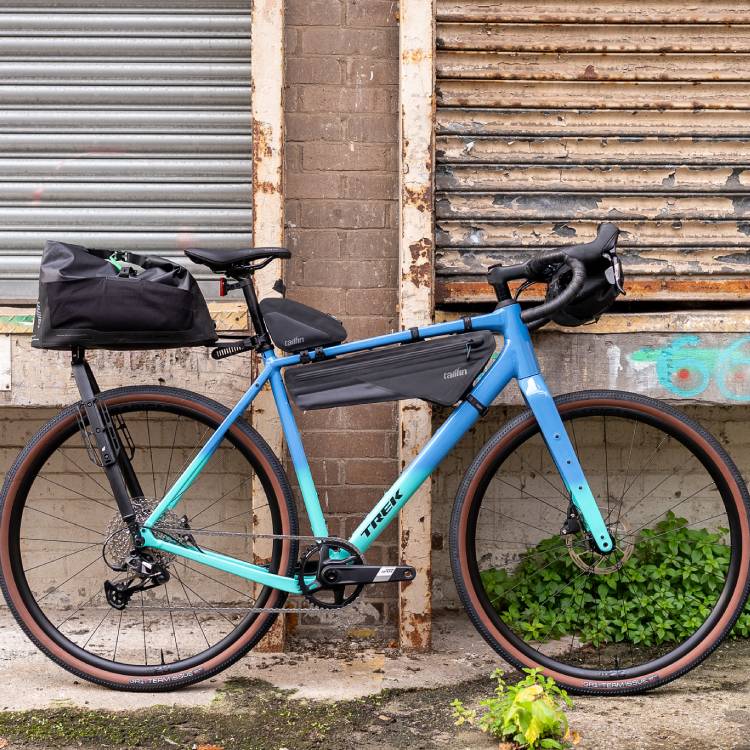
But what if you own a Rack and have decided to start off-road bikepacking? When heading off-road, particularly on full-suspension mountain bikes, the Fixed CargoPack or SpeedPack is a better option.
Gen 1 CargoPack Fixed and Removable
The CargoPack is our most popular Top Bag and can be both fixed to and removed from the Tailfin Rear Systems. The Gen 1 CargoPack is any CargoPack purchased before January 2026. To find out if your CargoPack is Gen 1 or Gen 2, please use our guide to check.
If you have the Fixed CargoPack Gen 1, you can make this bag removable by choosing the V1 Removable Connector Parts and the Alloy or Carbon Top Stay.
If you have a Fixed CargoPack and have purchased the Journey Rack, you will only need the connector parts and not an additional top stay.
When changing from the Removable CargoPack Gen 1 to make it a Fixed CargoPack system, you will need the V1 Fixed Connector Parts.
Gen 2 CargoPack Fixed and Removable
After January 2026, we made some changes to the CargoPack. The internal frame was redesigned and now has a 4-bolt connection at the front for the connecting hardware. To find out whether your CargoPack is Gen 1 or Gen 2, please use our guide.
To make your Fixed Gen 2 CargoPack a removable bag, you’ll need to purchase the V2 CargoPack Removable Connector Parts and an alloy or carbon top stay for your original Pannier Rack. These are available on our Spares Page.
If you have a Fixed CargoPack and have purchased the Journey Rack, you will only need the connector parts and not an additional top stay.
If you have the Gen 2 Removable CargoPack and wish to convert it to a Fixed CargoPack, you’ll require the Gen 2 Fixed Connector Parts.
Removable SpeedPack Rack Top Bag to Fixed SpeedPack
The SpeedPack Top Bag uses the same 4-bolt front connector attachment as the CargoPack, but requires different connector parts.
If you have the Fixed SpeedPack and you want the Removable SpeedPack, you’ll need the Removable SpeedPack Connector Parts and an alloy or carbon Top Stay for your original Pannier Rack. These are available on our Spares Page.
To convert your Removable SpeedPack to a Fixed SpeedPack, you’ll need our Fixed SpeedPack Connector Parts.
If you have a Fixed SpeedPack and have purchased the Journey Rack, you will only need the connector parts and not an additional Top Stay, as this is included.
Please note that the Fixed SpeedPack Connector Parts are not compatible with the Gen 2 CargoPack bags.
Changing between CargoPack and SpeedPack Bags
In keeping with modularity, if you have a CargoPack Top Bag and wish to switch to the SpeedPack, then this is also possible.
To switch from the Fixed CargoPack to the Removable SpeedPack, you can just purchase the SpeedPack Rack Top Bag, which includes the SpeedPack bag and Removable Connector Parts, as well as a Top Stay. These are available on our Spares Page.
Likewise for the Fixed SpeedPack. You can change to the Removable CargoPack by purchasing the CargoPack Rack Top Bag, which includes the CargoPack bag and Removable Connector Parts.
To move from the Fixed CargoPack to the Fixed SpeedPack, you can purchase the SpeedPack Top Bag and Fixed Connector Parts. If you have the Fixed SpeedPack and want to switch to the Fixed CargoPack, then you’ll need our CargoPack Top Bag and Fixed Connector Parts.
If you have a Removable Rack Top Bag and have purchased the Journey Rack, you will not need to purchase an additional Top Stay, as the Journey Rack comes with the top deck included.
Journey Rack
If you already have the original Alloy Pannier Rack (Pre May 2026), or current Carbon Pannier Rack and a Removable Rack Top Bag, and wish to change to the new alloy Journey Pannier Rack, you won’t need to change the connector parts on your Rack Top Bags; all the Rack Top Bags are compatible with the new Journey Rack.
If you purchase the Journey Rack with a Removable Rack Top Bag and wish to change to a Fixed System, then you just need to choose the correct Fixed Connector Parts for the relevant bag.
Once you have the new parts, you can follow our Assembly Guides to reassemble your system. If you’re unsure about which part of your Fixed or Removable system to change to convert it, then you can contact our Customer Service team for advice.